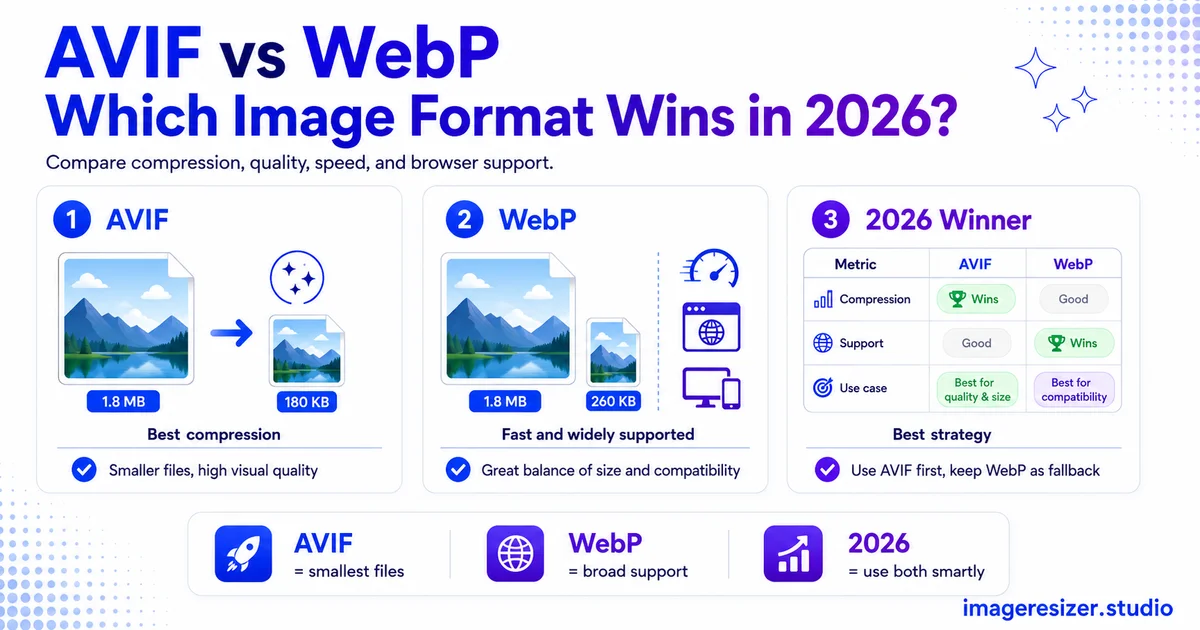
Both formats crush JPEG. Both support transparency and animation. Both work in almost every browser people actually use. So when you're choosing a modern image format in 2026, it really comes down to two names: AVIF and WebP.
They're close cousins, but they make different trade-offs. AVIF squeezes files smaller and handles color better. WebP encodes faster and has slightly wider reach. Pick wrong and you either leave file-size savings on the table or slow down your image pipeline for no reason.
The good news is that the answer is clearer in 2026 than it's ever been, because both formats have crossed the threshold of near-universal browser support. The decision is now about your specific use case, not compatibility fears.
This guide compares AVIF and WebP head to head on file size, quality, browser support, encoding speed and features, then tells you exactly which to use and when.
The quick verdict
If you want the short answer before the detail, here it is.
- Smallest files and best quality: AVIF wins, typically 20-35% smaller than WebP for photos
- Fastest encoding and simplest to serve: WebP wins, often many times faster to encode
- Widest browser support: WebP has a slight edge at about 97% vs AVIF's 95%
- Best color and HDR: AVIF only, WebP can't do HDR or wide color gamut
- The pro move: serve AVIF with a WebP fallback and get the best of both
For most modern websites, AVIF is the better default in 2026 thanks to its compression, with WebP as the reliable fallback. But the right choice genuinely depends on your pipeline, which the rest of this guide breaks down.
Meet the two formats
WebP: the established veteran
WebP was released by Google in 2010, built on the VP8 video codec. It was the first next-gen web format to reach wide adoption, so for over a decade it's been the go-to upgrade from JPEG and PNG. It supports lossy and lossless compression, transparency and animation. WebP images are typically 25-35% smaller than JPEG at the same quality.
AVIF: the newer challenger
AVIF arrived in 2019 from the Alliance for Open Media, built on the much newer AV1 video codec. It uses more advanced compression than WebP, producing smaller files, plus it adds modern features like HDR and wide color gamut that WebP simply doesn't have. AVIF images are often around 50% smaller than JPEG.
Both formats do lossy and lossless compression, which is the foundation of how they shrink files. If you want the underlying concept, this guide to lossy vs lossless compression explains what each mode does before you compare the two next-gen formats that use them.
Round 1: File size and compression
This is AVIF's strongest category. Its AV1-based compression is more advanced than WebP's VP8 approach, so the numbers show it.
At the same visual quality, AVIF files are typically 20-35% smaller than WebP for photographs, sometimes reaching up to 50% smaller. Against JPEG, AVIF is around 50% smaller while WebP is around 25-35% smaller. So AVIF doesn't just beat JPEG harder than WebP does, it beats WebP too.
There's a catch worth knowing: the quality scales aren't directly comparable. AVIF at quality 60 can look as good as WebP at quality 80. You can't just copy your WebP quality setting over to AVIF and expect the same result, so testing your own images matters.
One nuance: for simple graphics with flat colors and sharp edges, the gap narrows. Both formats are already very efficient there, so WebP can occasionally match or beat AVIF. AVIF's advantage is biggest on complex photographs with rich detail and gradients.
Winner: AVIF, clearly, especially for photographic content.
Round 2: Image quality
Beyond raw file size, there's the question of how good the image looks, especially when compressed hard.
AVIF holds fine detail and color better at very low file sizes. It supports higher bit depths (10 and 12-bit color), which means smoother gradients and less banding in tricky areas like skies and studio lighting. For complex photos and HDR content, AVIF looks sharper at the same file size.
WebP is no slouch, with one quirk in its favor: at medium compression levels it sometimes preserves smooth gradients cleanly, where AVIF can occasionally introduce slight blockiness or a softer look. For most images the difference is subtle, but it exists.
Winner: AVIF for quality-per-byte and color depth, with WebP holding its own at moderate compression.
AVIF vs WebP: the head-to-head
Here's the full comparison across every dimension that matters for a real website.
Read across the rows and the pattern is clear: AVIF wins on size and quality, WebP wins on speed and reach. That split is the whole decision.
Round 3: Browser support
Both formats are now safe to use. According to the MDN Web Docs image format guide, newer formats like WebP and AVIF have seen increasing adoption as browsers without support become increasingly irrelevant.
WebP has the slight edge on reach at roughly 97% global support, having landed in all major browsers by 2020. AVIF sits at roughly 95%, supported in Chrome since 2020, Firefox since 2021 and Safari since 2023. Both cover the vast majority of real users.
The gap is small enough that it shouldn't be your deciding factor on its own. Using a fallback (more on that below) closes it completely, letting you serve AVIF to the browsers that support it and WebP to the rest.
Winner: WebP by a hair, but the fallback approach makes this a tie in practice.
Round 4: Encoding speed
This is WebP's strongest category, one that matters more than people expect.
AVIF's advanced compression comes at a cost: it's significantly slower to encode, sometimes many times slower than WebP. For a static website where images are converted once at build time, that's a one-time cost you never notice. But for a site that generates images on the fly (user uploads, constantly changing product photos, real-time resizing), AVIF's slow encoding can become a real bottleneck without serious server power.
WebP encodes fast, which makes it much easier to serve on demand. If your images are created dynamically rather than pre-built, WebP's speed is a genuine advantage.
Winner: WebP, decisively, for any on-the-fly or high-volume encoding scenario.
Want to convert your images to AVIF or WebP and compare the results? Use the free image compressor → to convert to either format in one step, or try the custom compressor → to control the exact format, quality and target size so you can test AVIF against WebP on your own images. Both run in your browser with no upload to any server.
Round 5: Features and color
Here AVIF pulls ahead with capabilities WebP simply doesn't have.
AVIF supports HDR (High Dynamic Range) and wide color gamut, plus 10-bit and 12-bit color depth. That means richer, more accurate colors on modern displays and smoother gradients. WebP is limited to 8-bit color in the standard sRGB space. For a photography portfolio, a media platform or any site where color fidelity on modern screens matters, AVIF is the only one of the two that can deliver it.
Both formats support transparency and animation. For animation specifically, though, WebP is currently the more practical choice: animated AVIF has better compression on paper, but the tooling is still maturing and encoding animated AVIF is much slower. For heavy animation, a real video format like MP4 usually beats both.
Winner: AVIF for still-image features and color, WebP for practical animation today.
The smart move: serve both with a fallback
Here's the approach that resolves the whole debate. You don't have to pick just one.
Using the HTML <picture> element, you can serve AVIF as the primary format with WebP as the fallback and JPEG as a final catch-all. Modern browsers get the smallest AVIF file, browsers that don't support AVIF get WebP, and anything ancient gets JPEG. Nobody sees a broken image, and every visitor gets the best format their browser can handle.
This is the recommended strategy for most production sites in 2026. It captures AVIF's compression savings where possible without giving up any compatibility. The one real cost is the extra encoding work to produce multiple formats, which is why build-time conversion (rather than on-the-fly) suits this approach best.
For the wider view of how AVIF and WebP sit alongside JPEG and PNG in a full workflow, this comparison of JPEG vs PNG vs WebP vs AVIF covers all four formats and when each one wins.
Which should you actually use?
Use AVIF when
- Your images are photographs, especially detailed or high-resolution ones
- Bandwidth and load speed are top priorities
- You need HDR or wide color gamut for a photography or media site
- You convert images at build time, so slow encoding doesn't matter
Use WebP when
- You generate or resize images on the fly and need fast encoding
- You want the simplest single-format setup with the widest reach
- Your images are mostly simple graphics, logos or flat-color designs
- You're serving animation and want mature, reliable tooling
Use both when
For most production websites, serving AVIF with a WebP fallback is the ideal answer. You get AVIF's savings for the browsers that support it and WebP's reliability everywhere else.
Whichever you choose, remember that format is only part of the picture. Resizing images to their display size and hitting sensible file-size targets matters just as much. Here's how to reduce an image to a specific size like 100KB, which pairs with format choice to get truly small files.
A note on replacing PNGs
Both AVIF and WebP can replace PNG for graphics that need transparency, at a fraction of the size. If you have heavy PNGs on your site, converting them to WebP or AVIF is usually a bigger win than compressing the PNG itself, though here's how to compress PNG images if you need to keep the PNG format for compatibility reasons.
For flat-color logos and icons, WebP or even SVG often makes more sense than AVIF, since AVIF's photo-focused compression advantage shrinks on simple graphics.
4 mistakes to avoid
1. Copying WebP quality settings straight to AVIF
AVIF at quality 60 can match WebP at quality 80. Reusing your WebP number produces a bigger file than needed or worse quality than expected. Test AVIF settings on your own images.
2. Using AVIF for on-the-fly encoding without the horsepower
AVIF's slow encoding can choke a server that converts images on demand. For dynamic, high-volume image generation, WebP's speed is the safer pick unless you have serious infrastructure.
3. Skipping the fallback
Serving AVIF only leaves out the small slice of browsers that don't support it. The picture element with a WebP fallback costs little and covers everyone.
4. Using AVIF for simple graphics expecting huge savings
AVIF's advantage is largest on complex photos. For flat logos and icons, the gap over WebP shrinks, so WebP or SVG may serve you better with less encoding cost.
Wrapping up
In 2026, AVIF is the better format on the two things that matter most for images: file size and quality. It's roughly 20-35% smaller than WebP for photos and adds HDR and wide color that WebP can't touch. WebP answers with faster encoding, slightly wider support and simpler serving, which keeps it the safer default for on-the-fly image pipelines.
The honest conclusion is that you rarely have to choose. Serve AVIF with a WebP fallback and you get AVIF's compression where browsers support it and WebP's reliability everywhere else. For build-time images, that's the winning setup. For on-the-fly encoding, lean WebP.
Both beat JPEG by a wide margin, so whichever you pick, moving to a next-gen format is one of the highest-impact speed upgrades your site can make.