Every social platform changed something about image sizes in 2026.
Instagram added 3:4 as the new grid standard. Facebook bumped ad images up to 1440x1800. LinkedIn quietly increased feed image preferences to 1200x1200. Pinterest still wants vertical pins. TikTok still wants everything 9:16.
If you're still using a 2023 cheat sheet you printed out, half of it is wrong. Posts get cropped. Profile photos get distorted. Stories cut off your captions. Reels lose engagement because they don't fill the screen properly.
This guide is the complete, verified 2026 reference. Every dimension for every major platform. Every aspect ratio. Every file size limit. Plus the small platform updates from this year that most other guides haven't caught up to yet.
Bookmark this page. Come back to it before every campaign. The platforms will keep changing and this guide will keep getting updated.
Universal rules that apply across every platform in 2026
Before the platform-specific dimensions, internalize these five rules. They cover 80% of all social media image decisions.
1. 1080 pixels wide is the universal standard
Almost every platform optimizes for 1080 pixels on the shortest edge. Higher resolutions get compressed down anyway. Lower resolutions look soft on modern phone screens. 1080 is the magic number.
2. Vertical (4:5 or 3:4) beats square for feed engagement
Studies from Buffer, Hootsuite and Sprout Social all confirm the same finding. Vertical feed posts get up to 40% more engagement than squares because they occupy more screen real estate on mobile. Default to portrait whenever the platform supports it.
3. 9:16 (1080x1920) is the universal full-screen format
Instagram Stories, Instagram Reels, Facebook Stories, TikTok, YouTube Shorts, Snapchat. All five use 9:16. Design one vertical asset and you can post it everywhere.
4. JPEG at 85-90% quality is the safe default
Every platform accepts JPEG. Most also accept PNG and some accept WebP, but JPEG at high quality keeps file sizes manageable while letting the platform's own compression do less damage on top.
5. Faces and text belong in the center 80% of the frame
Every platform crops differently in different views (feed vs profile grid vs notification preview). Keep your important content away from the edges so it survives every possible crop. This same principle applies beyond social: passport photos use a similar safe-zone rule where the face has to fill the center 70-80% of the frame for biometric checks to pass.
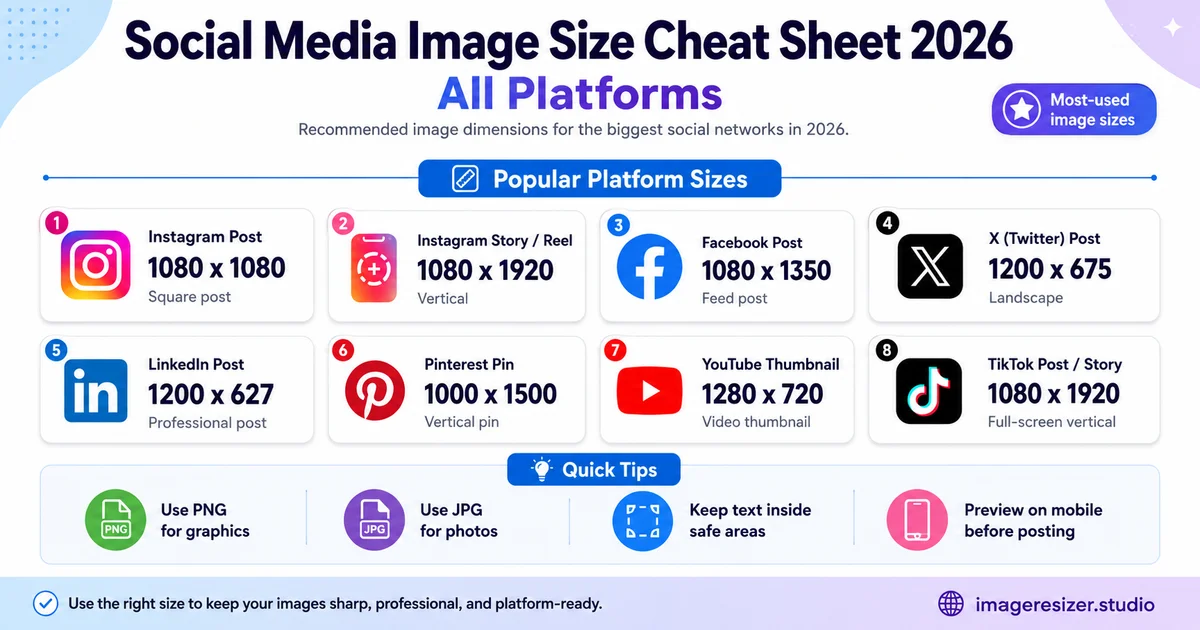
The master cheat sheet (all platforms at a glance)
Visual reference. Save this image. Reference it before every upload.
Instagram (the most format-diverse platform)
Instagram added support for 3:4 photos in 2025 and made it the new grid-optimized standard in 2026. The platform now offers three viable feed ratios depending on your goal.
Feed posts (in order of preference)
- Grid-optimized: 1080 x 1440 (3:4 ratio). New 2026 standard. Matches phone camera defaults and the new profile grid layout perfectly
- Social standard: 1080 x 1350 (4:5 ratio). Largest size for in-feed display. Trims slightly when shown in profile grid (keep 35px side margins)
- Square: 1080 x 1080 (1:1 ratio). Still works but takes less screen space
- Landscape: 1080 x 566 (1.91:1 ratio). Lowest performing format on mobile
Stories and Reels
- Canvas: 1080 x 1920 (9:16 ratio)
- Safe zone for text and logos: center 1080 x 1420 area (leave 250 px clear at top and bottom for UI overlays)
- Maximum file size: 30 MB per image
Profile and other
- Profile photo: minimum 320 x 320, displayed as circle
- Reels cover (in feed): 1080 x 1920, but cropped to 1:1 in the grid. Design the center 1080 x 1080 as your primary visual
- Carousel posts: same ratio across all slides. 1080 x 1080 or 1080 x 1350 are the most common
Facebook is the most format-confusing platform because image sizes differ across desktop and mobile and the platform has been quietly upgrading ad dimensions throughout 2025-2026.
Feed posts
- Landscape link preview: 1200 x 630 pixels
- Square post: 1080 x 1080 pixels
- Portrait post: 1080 x 1350 pixels (matches Instagram, ideal for cross-posting)
Cover and profile
- Cover photo (desktop): 851 x 315 minimum, upload at 1640 x 624 for retina sharpness
- Profile photo: minimum 360 x 360 pixels
- Event cover: 1920 x 1005 pixels
- Group cover: 1640 x 856 pixels
Stories and ads
- Story: 1080 x 1920 pixels
- Feed ad (square): 1440 x 1440 pixels (new 2026 standard)
- Feed ad (portrait): 1440 x 1800 pixels
- Maximum file size: 30 MB per image
LinkedIn rewards professional, well-sized content. Underspec'd images on LinkedIn look noticeably worse than on Instagram because the audience scrutinizes them more carefully.
Feed content
- Feed post (square): 1200 x 1200 pixels (new 2026 preference)
- Feed post (landscape): 1200 x 627 pixels
- Article cover: 1200 x 644 pixels
- Document carousel slide: 1080 x 1080 pixels each
Profile and company pages
- Personal banner: 1584 x 396 pixels (4:1 ratio)
- Company page cover: 1128 x 191 pixels
- Profile photo: minimum 400 x 400 pixels
- Company logo: 300 x 300 pixels
- Maximum file size: 8 MB per image
X (formerly Twitter)
X keeps changing its name but the image specs have been stable for two years. Square and landscape both work but landscape gets slightly more feed real estate.
Posts and replies
- Single image (landscape): 1600 x 900 pixels (16:9)
- Single image (square): 1080 x 1080 pixels
- Multi-image (2 images): each at 1080 x 1080
- Multi-image (3 or 4 images): each at 1080 x 1350
- Link preview card: 1200 x 628 pixels
Profile
- Header photo: 1500 x 500 pixels
- Profile photo: 400 x 400 pixels
- Maximum file size: 5 MB per image (15 MB for animated GIFs)
TikTok
TikTok is video-first but photo carousels (slideshows) have exploded in 2025-2026 and now drive significant engagement. Every static asset on TikTok should be vertical.
- Video / image slideshow: 1080 x 1920 pixels (9:16 ratio)
- Profile photo: minimum 200 x 200 pixels
- Safe zone for text overlays: keep 150 px margin at top and bottom, 64 px at sides
- Photo carousel: up to 35 images per post, all at 1080 x 1920
- Maximum video file size: 287 MB (iOS), 72 MB (Android)
YouTube
Thumbnails are the single most important visual asset on YouTube. The right size combined with high contrast is what drives click-through rate.
Thumbnails and channel art
- Thumbnail: 1280 x 720 pixels (16:9)
- Channel banner: 2560 x 1440 pixels (safe zone for logos and text: center 1546 x 423 area)
- Profile photo: 800 x 800 pixels
- Maximum thumbnail file size: 2 MB
- Maximum banner file size: 6 MB
YouTube Shorts
- Canvas: 1080 x 1920 pixels (9:16)
- Safe zone for captions: center 1080 x 1700 area
Need to resize your photo to any of these dimensions right now? Use the image resizer → for quick platform presets, or try the custom resizer → if you want to set exact dimensions, file size and quality in the same window.
Pinterest is the only major platform where portrait beats every other format dramatically. The recommended pin size is 2:3 vertical and anything wider tends to underperform.
- Standard pin: 1000 x 1500 pixels (2:3 ratio)
- Square pin: 1000 x 1000 pixels
- Long pin: 1000 x 2100 pixels (allowed but gets cut off in feed)
- Idea pin / Story pin: 1080 x 1920 pixels
- Board cover: 600 x 600 pixels
- Profile photo: minimum 165 x 165 pixels
- Maximum file size: 32 MB
Threads
Threads (Meta's text-first platform) uses the same image standards as Instagram. If you've already prepped content for Instagram, it works on Threads with zero changes.
- Image post: 1080 x 1350 (matches Instagram portrait)
- Profile photo: pulled from Instagram automatically
- Maximum file size: 8 MB per image
Bluesky
Bluesky has been growing fast in 2025-2026. The image specs are similar to X but with slightly more generous file size limits.
- Image post (landscape): 1200 x 675 pixels (16:9)
- Image post (portrait): 1080 x 1350 pixels (4:5)
- Header: 3000 x 1000 pixels
- Profile photo: 1000 x 1000 pixels
- Maximum file size: 1 MB per image
Snapchat
Snapchat is fully vertical. Every static image should be 9:16.
- Snap photo: 1080 x 1920 pixels
- Ad image: 1080 x 1920 pixels
- Profile photo (Bitmoji): managed via Bitmoji app
- Geofilter: 1080 x 1920 pixels with transparent PNG
The cross-platform posting strategy
If you're posting the same content to multiple platforms, you have two workflows.
The lazy approach (works for 80% of posts)
Create one asset at 1080 x 1350 (4:5 portrait). Upload it to Instagram, Facebook, LinkedIn and Threads. It looks correctly proportioned on all four. The only platforms that need different sizes from this base are Pinterest (use 1000 x 1500), TikTok/Stories/Reels (use 1080 x 1920) and YouTube thumbnails (use 1280 x 720).
The polished approach (worth it for campaigns)
Create platform-specific versions for each major channel. The extra 10 minutes of resizing earns visibly better display quality, less awkward cropping and slightly higher engagement. For paid campaigns or important launches, always create dedicated assets. If you're prepping the same set of images for 5+ platforms at once, the bulk image resize workflow lets you process all your platform variants in a single session instead of resizing each one manually.
File format guidance across all platforms
JPEG
The default. Use for photos, lifestyle shots and anything with smooth color gradients. Quality setting of 85-90% gives the best balance between file size and visible quality after the platform compresses it further. If your platform has a strict file size limit (LinkedIn caps at 8 MB, X at 5 MB), here's how to resize an image to a specific KB or MB target so you hit the limit precisely without sacrificing quality.
PNG
Use for graphics with sharp edges, text, logos and anything that needs transparency. PNG files are larger than JPEG but the platforms compress them less aggressively because PNG handles edges better.
WebP
Some platforms (Meta family, LinkedIn) now accept WebP. It gives 25-35% smaller file sizes at the same visible quality. Use it when supported but always have a JPEG fallback for platforms that still don't accept WebP (TikTok, older third-party schedulers).
GIF
Animated content. Most platforms accept GIFs but file size limits are stricter (5-15 MB depending on the platform). Modern alternatives (MP4 video, animated WebP) usually look better and load faster.
5 mistakes that ruin cheat-sheet-perfect uploads
1. Uploading at exactly the maximum
If LinkedIn says "8 MB max," don't upload an 8 MB file. Aim for 70-80% of the limit. Files at the exact max sometimes get re-compressed more aggressively or rejected for slow processing.
2. Ignoring safe zones
Cheat sheets give you the canvas dimensions. They don't always show the safe zone where text and logos won't get cropped by UI overlays. Stories, Reels and TikTok all have UI that covers the edges of your image. Keep important content in the center 80%.
3. Saving as PNG when JPEG would work
A 1080x1350 photograph saved as PNG can be 5-8 MB. The same photo as JPEG at 85% quality is 200-400 KB. Use PNG only when you have transparency or sharp text. Photos = JPEG.
4. Not testing on mobile
Most cheat sheets are written assuming desktop display. Many designers create images on a 27-inch monitor and forget that 95% of social media viewing happens on a 6-inch phone screen. Always preview on mobile before publishing.
5. Stretching to fit
If your photo is 4:3 and the platform wants 4:5, don't stretch it. The result looks distorted and the platform's algorithm sometimes flags stretched content as low quality. Crop to the right ratio instead.
Frequently Asked Questions
What's the safest universal image size for posting on multiple platforms?
1080 x 1350 pixels (4:5 portrait). It works correctly on Instagram, Facebook, LinkedIn, Threads and Bluesky without any platform forcing a crop. For Pinterest use 1000 x 1500 instead. For Stories, Reels and TikTok use 1080 x 1920.
Did Instagram really change to 3:4 in 2026?
Yes. Instagram added 3:4 support in late 2025 and made 1080 x 1440 the new grid-optimized standard in 2026. The old 1:1 square still works but the profile grid now displays everything at a 3:4 ratio, which means square posts get visible borders or get cropped. The new 3:4 fits the grid perfectly.
What image size gets the most engagement on social media?
Vertical formats (4:5 and 9:16) consistently outperform square and landscape on every mobile-first platform. Vertical posts take up more screen space, which means viewers spend more time looking at them while scrolling. Studies from Hootsuite, Buffer and Sprout Social all confirm portrait images get 30-40% more engagement than squares.
Should I use JPEG or PNG for social media?
JPEG at 85-90% quality for photos, lifestyle shots and most general content. PNG for graphics with text, logos, sharp edges or transparency. WebP is accepted on Meta platforms and LinkedIn for smaller file sizes, but always keep a JPEG version as fallback for platforms that don't accept WebP (TikTok, older schedulers).
How often do social media image sizes change?
The major platforms update specs every 12-18 months. Instagram changed to support 3:4 in 2025. Facebook bumped ad sizes in 2026. LinkedIn quietly increased feed image preferences this year. Subscribe to platform changelogs (or to guides that update regularly) to catch changes before they affect your campaigns.
📚 Also Read
→ How to Resize an Image to a Specific File Size (KB or MB)
→ Resize Image to Passport Size: Country-Wise Requirements
→ How to Bulk Resize Images: A Complete Batch Resize Guide
Wrapping up
Social media platforms aren't going to standardize on one image size. They're going in opposite directions: vertical on mobile-first platforms, horizontal on YouTube, 4:1 banners on LinkedIn, 2:3 portrait on Pinterest. Each platform has decided what works for its own feed.
Your job is to give each platform what it wants. Use this cheat sheet. Match the dimensions exactly. Default to 1080 x 1350 when you can't be bothered to create platform-specific versions. And bookmark this page so you always have the current numbers.
This guide gets updated every quarter as platforms shift their specs. Come back before any big campaign.